Click to see latest software crack

We daily update software zone,you can also mad request for software crack varsion.

Click to see about latest gadgets release

All latest gadgets news and it's classifications.

Click to see latest PC tricks

For make windows 7 fastest booting and know more about computers.

Click to see about Android

For Android rooting and latest popular android game and apps.

Click to see tricks for Windows phone

Get tricks for lumia,HTC and latest new for windows phone 8 update.

Showing posts with label Others. Show all posts

Friday, 27 September 2013

Difference Between Debit Card & Credit Card

Debit Card

Debit card are directly linked to our current account. When we are doing payment with our credit card then the money is automatically cut from our account. Most of the time when people are going for shopping then it is not easy to carry lots of money with them at that time the debit card plays a very efficient role. By the use of debit card people do shopping and the whole payment of the shopping is done by their debit card. It also helps you to have control on your savings. We can get the full details of saving and the details of all transaction through internet banking. In this way we can have control over our expenditures.

Credit Card

Credit card is far different from debit card. Credit card is not linked directly to your current account. When you do shopping with your credit card the whole cost of your payment is added to your credit account. You will get the last date to pay your credit. But if you don’t pay the credit on time then you will have to pay interest on it and as the day increases the interest also increases. So it is better to pay the amount on time for less interest.
Main Difference Between Debit Card & Credit Card
Basic difference between debit card and credit card are that debit card are linked to your current account but in comparison credit cards are not. In debit card you will have to submit the draft before using the card whereas in credit card you will have to submit the desired amount after using the card.

Visa Card Vs MasterCard

Most of the people in this world uses visa card among which many of them uses MasterCard. The people who uses MasterCard may not know about visa card. And people using visa card may not know about MasterCard. But many people around us even don’t know about any of these cards. 

Visa Card

visa card
Visa card is the world’s largest retail electronic payment network. Visa card has been designed to fulfill the certain needs of life and achieve a perfect lifestyle. Now the users of visa card have to pay with the help of debit card or with their credit card.
Visa provides worldwide currency which they can use anywhere in this world at any time. Visa card holder can use this card for payment in more than 200 countries.
Visa card provides peace of mind to the card holders since with this the user can pay before with the use of debit card and also pay after an interval of time with their credit card. And can use anytime and anywhere in this world.
Visa card has 16 digit pin number a 3 number code. Visa card are the visa pay wave.

MasterCard

Mastercard

MasterCard is based on mesh network where it is not necessary to pass through the center point. In the MasterCard the transaction directly reaches to the endpoints. Visa cards use star network since every transaction has to pass through the center point.
As visa card MasterCard is a card payment network. It provides various financial services to banks as well as clients. MasterCard also provide facility to do payment all around the world.
MasterCard are the pay pass. MasterCard is a contact less payment card as that of visa card. For the payment device terminals are used rather than swapping machines.
MasterCard Secure code is new service. It provides you your personal code to protect your online transactions. Like using pin code will doing transaction with ATM card.
by taking an overall view we can say that visa card as well as MasterCard both are worldwide electronic payment network. With these cards  we can do transaction at anytime and anywhere in this world.

Thursday, 15 August 2013

New Rupee Symbol of Indian


Download the attached font. -->

Install/save to "fonts" folder of your PC : Location : C:/Windows/Fonts

Open your word processor and select Font the "Rupee_forindian”.


Just select "Rupee" font from the drop down list of your fonts in your application
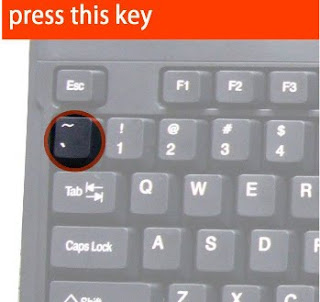
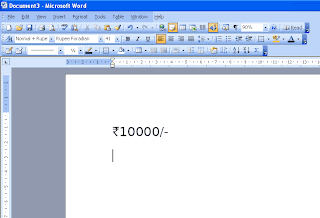
and press the key just above your tab button. It will display the new rupee symbol of India. Try it.
Make Use of  It..

                                                                  Download :
                                                               Download Font

Thursday, 16 May 2013

Online application to apply Appointment for Learning License Test


first of all go to webiste https://sarathi.nic.in
Follow below steps:
1. Please ensure that Acrobat Reader Version 9.x and Internet Explorer
7.0 or above are installed in your computer system. It may not
respond properly with Google Chrome or Mozilla Firefox browser.
Advised to use Internet Explorer 7.0 or above only.
2. Open Adobe Reader version 9.x
Select Edit —> Preferences —> Security (Enhanced)
Uncheck “Enable enhanced security”, available on the right side and
Press OK Button.
3. Select “Issue of a Learning License to me” link from the
“On-line Transactions with Sarathi” menu on the Main Page.
4. Please ensure that the Application Number (Ex: 125650) is displayed
to you on the top right corner of the form. If the Application number is
not displayed, then the form cannot be submitted. In that case, you
are advised to recheck the specifications of Adobe Reader and
Internet Explorer versions as mentioned in the first two points and
retry.
5. Fill the form shown to you on the system only when the Application
Number is generated. Boxes marked with ‘*’ in RED color are
mandatory and should be filled in without fail.
6. After filling the form, save it by pressing the button for your comfort.
7. Then opt to “Submit” to send the Application form along with the
details to the RTO/DTO concerned.
8. Please note down the Application Number and the date of birth for
future reference or to take Appointment for LL test.
9. After application is submitted a message will be displayed as “Your
Application is Saved Successfully”. Then you may close the form.
In case of any problem during the submission, no need to worry. You
can try by submitting the form that was saved.
Appointment for LL Test
1. To take appointment for LL Test, select “Appointment for LL Test”
from “On-line Transaction with Sarathi” menu (on the Main Page).
2. Go to “Slot Booking” and select “ For LL Test”
3. For any assistance / help regarding Slot Booking for LL Test select
“Help”.
4. Provide your Application Number and date of birth as mentioned
while filling the form, for selecting the slot.
5. Book your slot as per your choice and availability.
6. Save the slot data and keep the printed acknowledgement slip with
you.
Go to the respective RTO office with the printed acknowledgement
and all required documents 1 hour before the scheduled time of the
slot allotted to you.
For Demonstration of Learner’s License Testhttp://ltest.guj.nic.in

Tuesday, 14 May 2013

Tips To Book An IRCTC Tatkal Ticket Faster

irctc_cover_640x360
In India, trains are one of the easiest and cheapest modes of transport. Over the years, booking train tickets has become convenient using the IRCTC (Indian Railway Catering & Tourism Corporation) website. In fact, according to the comScore and ASSOCHAM India report, IRCTC is the leading travel e-commerce site in the country with the highest transaction share in the travel category. One out of five online users in India visits the Indian Railways site, with almost 12 million unique visitors monthly and majority of the traffic is seen between 10 am to 12 pm. It is during this time that IRCTC allows bookingTatkal tickets, which means tickets that are reserved for people with last minute travel plans, travel emergencies and so on. IRCTC receives a lot of flak for its slow, sluggish performance and had become a laughing stock when the site crashed (server inability, low bandwidth) during the festivities last year, just minutes after Tatkal bookings began. Currently, it is said to sell about 40-45,000 Tatkal railway tickets between 10 am and 11 am (its 10 and 11, because all tickets are sold in one hour – in fact, 45 mins), which it plans to spruce up to 60-65,000 with the help of its new Rs. 10 crore drive for better, upgraded servers to 64GB RAM. This will allow 80 lakh concurrent connections compared to the current 10 lakh. The Tatkal online booking window opens a day in advance before the date of your journey just for an hour and tens of thousands of people try to log into the Tatkal booking system, which makes it as tough as getting into an overcrowded Mumbai local train during the peak office hours.
If you’ve ever tried booking a Tatkal ticket, you will know how important each minute is and how annoying IRCTC’s online passenger reservation system can get. You have to make optimum use of each second as soon as the online booking counter opens, and those 5 to 10 minutes before the counter opens are also very crucial. We’ve laid out a guide to help you book a Tatkal ticket, along with a set of handy tech tools and tips and tricks that will help you bag a confirmed Tatkal ticket faster.
tatkal_session_expired_091547372885_640x360
Keep the page active
 
First, the Tatkal or last minute online booking window opens only a day in advance of your journey between 10 am and 12 am. A person can book only two Tatkal tickets on one user id, so for any more tickets you will need to login using other IRCTC user ids. Now, you need to successfully log into the IRCTC reservation system at exactly 10 a.m., but remember, there are tens of thousands of other people trying to log into the site, so one needs to be really quick. Try to login using multiple accounts on different browsers such as Mozilla, Chrome, Opera or take a hand from your pals 10 minutes before. For this, ensure that your time is synced with the IRCTC server time, so that there are no issues due to difference in time as a delay in a minute means lesser chances of getting a ticket.
To know the IRCTC server time, click here, key in any number, click on “Get Schedule” and the lower right side will show you the exact broswer time at IRCTC, or you can even log into your IRCTC account. Besides, you can also use the Firefox add-on tool to sync the time with your computer. By installing the add-on, the userscript will provide the realtime view of what the server time is once you log into your IRCTC account. This add-on is also available for Chrome.
Once you log in with the IRCTC account, the key is to keep the session active. Those who have triedbooking a Tatkal ticket may have often faced the error which says “Session expired”, which means you have to start logging in again, and this delay can cost you your ticket. To keep the session alive, ensure that the screen doesn’t go idle for more than 3 minutes, because as soon as it does, the session will expire. So do not spend time thinking which ticket to choose or go hunting for your debit/credit card details at the last minute; keep everything handy so that the screen doesn’t go idle.
As the only way to avoid the session from expiring is keeping the page active, here are two handy tricks. You can use this link. All you need to do is make a note of the Session ID and the Engine ID (from theaddress bar), replace it with your session and engine IDs and use the URL in another browser (For instance, if you are using Chrome, then use it in Firefox) and keep doing it till you complete yourbooking process. If you think this is a complicated method, then the other trick to keep your session active is by going to the IRCTC website > Login > General > Terms & Conditions. All you need to do is copy the “Terms and Conditions” URL in another browser and keep pinging it every 2-3 minutes.
As soon as you successfully log into IRCTC, choose the starting point and destination, then a list of trains will appear and you can choose the train and the ticket type – Sleeper, 3-tier AC, 2-tier AC and so on. You will then have to key in all the necessary details including an identity proof. One has to be really quick in filling these details and don’t forget to keep your identity proof  handy. For instance, if you plan to choose the PAN card, then make a note of the PAN number. As you have to be very quick and can’t keep typing in details for minutes, here’s what you can do – keep all the information like name of the passengers, age, PAN number handy in a notepad and just copy paste the information while booking the ticket.
magic_autofill_091547389493_640x360
Another alternative is an extremely handy tech tool called Autofill that can be used on Firefox as well asChrome. Using the autofill add-on or extension, you need to visit IRCTC, say, about half an hour or so before the Tatkal bookings begin. Just go to the usual ticket booking page and fill in your details. Simply follow the booking procedure till you reach the payment gateway and then go no further. The add-ons will ensure that the browser remembers these details and you will not have to spend a lot of time typing them while booking the Tatkal ticket. Another tool you can use is the Magic Autofill. To use this tool, fill in all your details and click on “I’m feeling lucky”, a  “Magic Autofill” blue button will appear and you have to drag it into your bookmarks. While booking the Tatkal ticket, once you are done finalising the train and berth, click on the Magic autofill and it will do the rest and you can quickly proceed to payment.
The IRCTC website is jam packed and quite slow during Tatkal booking, so ensure that you are patient and do not double click on anything or hit the backspace button as this will log you off and you will need to start the complete procedure again. You will even come across a message that reads “Service Unavailable”; in this case, just keep refreshing the page. Once you are done with the payment, wait until it takes you back to the IRCTC page (unless the transaction fails).
These tech tools and simple tips and tricks will definitely increase the chances of bagging a confirmed ticket. Do share with us your experience of booking a Tatkal ticket.